

GTA 6 Company Cars starts with Santino, the Y Hotel’s concierge, after Pool Day. Ask about the cars and travel to Status Auto Imports in Bayside, where Rob shows five choices. Pick one for each character, then follow your partner onto the freeway and race back to the hotel. Compare the stat cards before confirming either car.
Mission info
- Mission
- 64 of 93, Chapter 4, mission 3
- Type
- Main story mission
- Characters
- Jason, Lucia
 Jason Duval
 Lucia Caminos
- How it starts
- Speak to Santino at the Y Hotel concierge desk.
- Unlocks after
- Pool Day and the concierge conversation
- Location
- Y Hotel and Status Auto Imports, Bayside
- Reward
- One free car for each character.
- Trophy
- None
- Required for 100%
- Yes
- Previous
- Another Life
- Next
- Lawyer Up
- Characters in this mission
 Dre’Quan Priest
Before You Start
- Speak to the concierge. Go to Santino near the main entrance of the Y. His conversation offers a car to the dealership.
- Compare before confirming. Walk beside each display car to bring up its stat panel, then select the car you want for the character named in the objective.
Objectives at a Glance
Company Cars Walkthrough
1Speak to the conciergeJason
- Talk to Santino at the Y Hotel and accept the trip to the dealership.
2Speak to the salesmanJason
- Find Rob at Status Auto Imports and mention Valentina.
3Follow RobJason
- Walk with Rob to the five cars prepared at the back of the showroom.
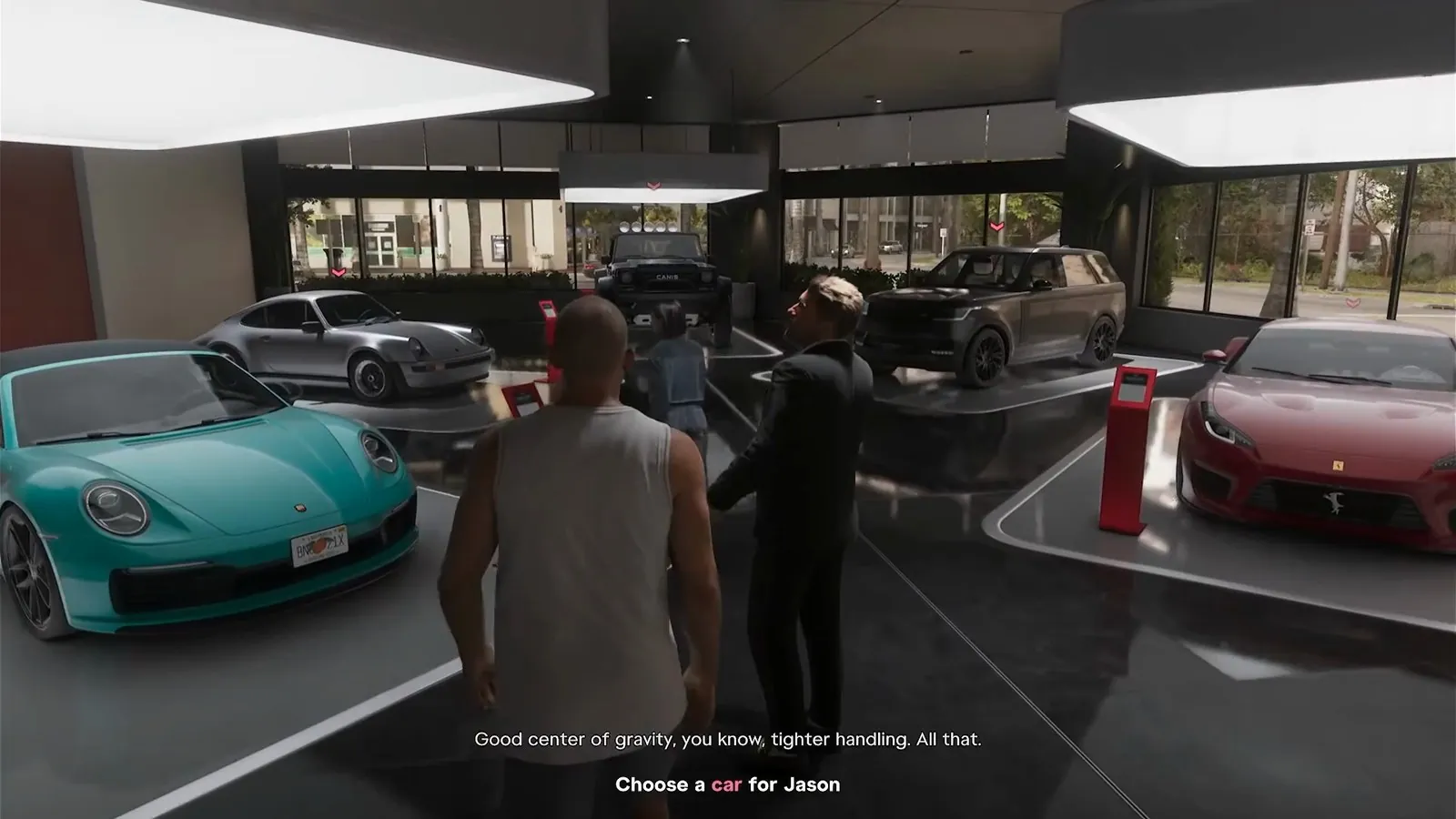
4Choose your first carJason
- Read the character name in the objective before approaching the car you want.
- Compare its stat panel, get into the driver’s seat and confirm your choice.
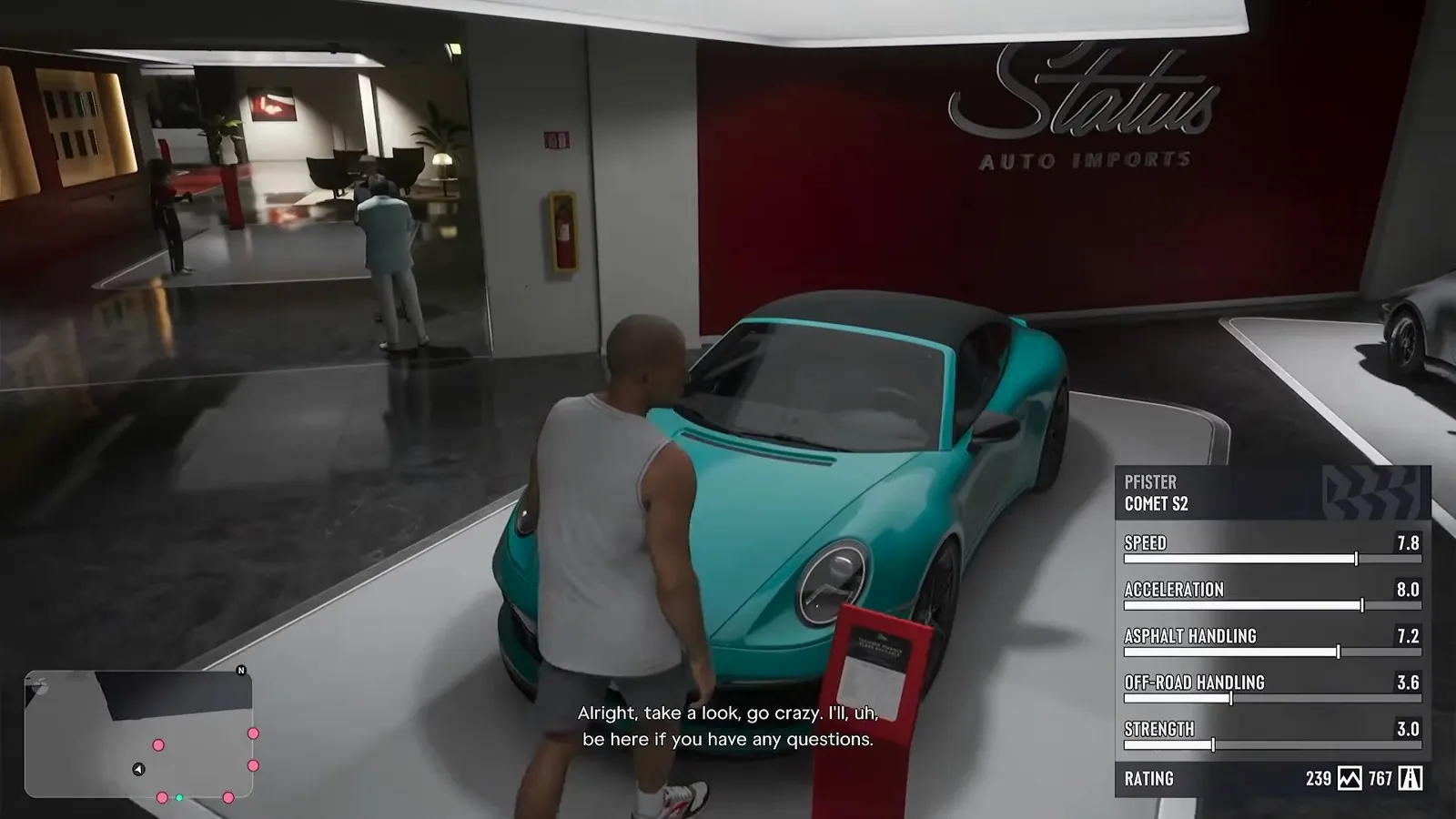
5Choose the other character’s carJason
- After control changes, choose a car for the other character and confirm it.
6Follow your partnerJason
- Leave the dealership in the new car and stay with your partner until the freeway challenge.
7Race to the Y HotelJason
- Follow the route back to the Y while leaving room to avoid traffic.
- Stop at the hotel entrance and let the closing scenes finish.
Which Car to Pick
The Pfister Comet S2 is the strongest road-performance choice in the showroom, with 7.8 speed, 8.0 acceleration and 7.2 asphalt handling. Pair it with a different vehicle if you want two distinct driving options rather than choosing solely by appearance.
The display names below distinguish the Pfister ’88 Comet, which Rob calls the Comet Retro, from the newer Comet S2. All figures shown are the in-game stat-panel values.
Inspect the Kamacho at its display before confirming if you want to compare the truck’s figures with the road cars.
Tips
Troubleshooting
I did not get told about any free cars.
Talk to Santino at the Y Hotel concierge desk. His hotel-services conversation introduces the dealership visit.
The objective says Lucia first. Is the order wrong?
Follow the objective shown in your game. The first car is for the character named there, then control changes for the other selection.
Rewards
The two selected cars become the couple’s own vehicles. Thompson Court Garage is reported to unlock after Company Cars with two parking spaces in Ocean Beach. The vehicles hub covers the wider car list.
GTA 6 Company Cars and Chapter 4
Follow the Chapter 4 guide or browse the missions hub. Compare the wider vehicle list when planning your garage.
Valentina has arranged the cars through a mutual friend. Rob asks the couple to remember the dealership when people ask about them. After the race, Dre’Quan visits the suite with a bag said to contain belongings left at the old apartment.
What Comes Next
Mission 65 · Jason and LuciaLawyer UpThe next Story Recap page is Lawyer Up. Follow Valentina’s message to arrange the meeting with Abe.Read the walkthroughShort on cash? Our Story Cash Boost puts cash in Jason’s and Lucia’s pockets and fills the BuckMe checking they share, on the save you already play. Your story progress stays where it is. Prefer a fresh start? Try the Story Mode Modded Save.
Get the Cash BoostGTA 6 Company Cars FAQ
No. Rob uses Comet Retro for the older car whose stat panel reads Pfister ’88 Comet.
No. Read the objective because a run starting the selection as Lucia names her first.
Yes. Santino describes the cars as arranged for you, and Rob lets each character select one without a purchase payment.
No. The lineup gives you a choice of sports cars, an SUV and a truck, so you can choose around the driving role you want.

I grew up on frame drops, boss fights, and midnight queues. Now I write about games with the same energy I once saved for ranked.