How To Get The Fornite Wishing Star Emote?
Getting the Fortnite Wishing Star Emote sounds simple until you start seeing posts about codes, quests, and random shop claims. That is where most of the confusion starts.
This article is for Fortnite players who want the official claim method, especially anyone moving from Nintendo Switch to Nintendo Switch 2. It fixes the confusion by using Epic’s support page and the official Fortnite Nintendo Switch 2 blog.

Fortnite Wishing Star Emote Assumptions
Official Path
The main reward path is a Fortnite login on Nintendo Switch 2 before the deadline Epic lists.
Account Check
If the emote does not appear, the next thing to check is whether you used the same Nintendo and Epic accounts.
Transfer Fix
Epic lists one extra reinstall step if you moved from Nintendo Switch to Nintendo Switch 2 with System Transfer.
Date Check
Epic says the emote may reach the Fortnite Shop later, but only after the free claim window ends.
Fortnite Wishing Star Emote Forks
- If you have not logged into Fortnite on Nintendo Switch 2 yet: go to Fortnite Wishing Star Emote Claim.
- If you already logged in on Nintendo Switch 2 but do not see the emote: go to Fortnite Wishing Star Emote Account Link.
- If you used System Transfer from Nintendo Switch to Nintendo Switch 2: go to Fortnite Wishing Star Emote System Transfer.
- If March 31, 2026 has passed: go to Fortnite Wishing Star Emote Shop.
Fortnite Wishing Star Emote Claim
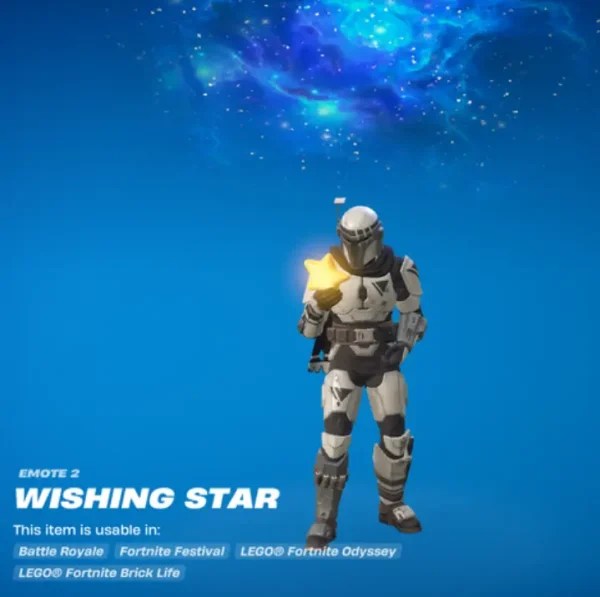
What It Does: This follows Epic’s official claim method. Epic says players who log into Fortnite on Nintendo Switch 2 by March 31, 2026 can receive the Wishing Star Emote, and Fortnite’s Nintendo Switch 2 blog says the reward is granted the first time you log into Fortnite on that console.
Type: Root Cause Fix.
- Turn on your Nintendo Switch 2.
- Open Fortnite.
- Sign in with the Nintendo account connected to the Epic account you use for Fortnite.
- Complete the Fortnite login on Nintendo Switch 2.
- Check your emotes in the Locker after the login finishes.
How To Undo It
- There is nothing to undo here. This is an account reward tied to a qualifying Nintendo Switch 2 login.
Fortnite Wishing Star Emote Account Link
What It Does: This checks the most common account mistake. Epic says that if your Nintendo account is already connected to your Epic account, you do not need to link it again on Nintendo Switch 2. You just need to use the same Nintendo and Epic accounts you were already using on Nintendo Switch. If the accounts were never linked, Epic says you can link them in Epic account settings.
Type: Root Cause Fix.
- Check which Nintendo account profile you opened on Nintendo Switch 2.
- Confirm it is the same Nintendo account you used for Fortnite on Nintendo Switch.
- Confirm that Nintendo account is connected to the Epic account you actually use for Fortnite.
- If your Nintendo and Epic accounts were never linked, open Epic account settings and link the Nintendo account there.
- Launch Fortnite again on Nintendo Switch 2 and complete the login with that account pair.
How To Undo It
- If you signed into the wrong account pair, go back to the Nintendo and Epic accounts you normally use for Fortnite.
Fortnite Wishing Star Emote System Transfer
What It Does: This fixes the official transfer edge case. Epic says that after a System Transfer from Nintendo Switch to Nintendo Switch 2, you should delete “Fortnite for Nintendo Switch” and then download Fortnite again from the Nintendo eShop.
Type: Root Cause Fix.
- On Nintendo Switch 2, delete “Fortnite for Nintendo Switch”.
- Open Nintendo eShop.
- Download Fortnite again.
- Launch the newly downloaded Fortnite install on Nintendo Switch 2.
- Sign in and check your emotes after the login completes.
How To Undo It
- Re-download Fortnite from Nintendo eShop if you removed the previous install during the transfer cleanup.
Fortnite Wishing Star Emote Shop
What It Does: This separates the free claim window from future shop speculation. Fortnite’s official Nintendo Switch 2 blog says the Wishing Star Emote may be available for purchase in the Fortnite Shop after March 31, 2026. Epic does not list a shop date or a price on the cited pages.
Type: Diagnostic.
- Check whether the current date is still on or before March 31, 2026 (U.S. time).
- If it is, use the Nintendo Switch 2 login method instead of waiting for a shop listing.
- If the date has passed, stop looking for a free claim path on Epic’s cited pages.
- Watch the Fortnite Shop for an official listing instead of relying on unconfirmed price posts.
How To Undo It
- There is nothing to undo here. This is a status check, not a setting change.
Fortnite Wishing Star Emote FAQs
Log into Fortnite on Nintendo Switch 2 by March 31, 2026. Fortnite’s official Switch 2 blog says the emote is granted the first time you log into Fortnite on that console.
Yes. Epic’s official pages tie the reward to a Fortnite login on Nintendo Switch 2.
During the official claim window, Epic describes it as a login reward on Nintendo Switch 2. Epic does not list a purchase price on the cited pages.
No code is listed on Epic’s cited pages. The official requirement is a qualifying Fortnite login on Nintendo Switch 2.
No. Epic says you do not need to link it again if your Nintendo account is already connected to your Epic account. You just need to use the same accounts.
Epic says to delete “Fortnite for Nintendo Switch” after the transfer and then download Fortnite again from the Nintendo eShop.
Epic’s cited pages do not list a specific game mode or playlist requirement. The stated requirement is logging into Fortnite on Nintendo Switch 2.
The free login reward window ends on March 31, 2026. Epic says the emote may be available for purchase later, but Epic does not confirm a date or price on the cited pages.
Epic’s official Nintendo Switch 2 blog only says the emote may be available for purchase after March 31, 2026. It does not list a current shop date on the cited pages.